
The Shift
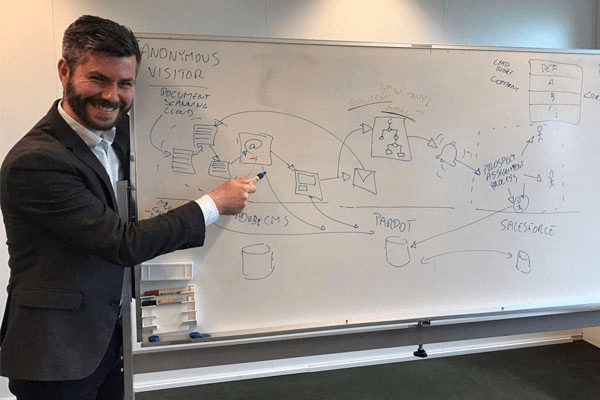
I’ve had many “whiteboard moments” in my career. You know the ones where you start with a simple request, draw a few boxes, and suddenly realize that “simple” request is actually a complex web of security, scalability, and data integrity questions.
For years, the Salesforce Marketing Cloud ecosystem has been driven by specialists who know how to build things. You might even be one of them. We pride ourselves on knowing the quirks of AMPScript, the hidden features of SQL in Automation Studio, or the exact syntax for SSJS.
But the landscape is shifting. We are entering an era where AI can write the syntax for you. If you ask ChatGPT to “write an SSJS script to parse a JSON payload,” it will do it in seconds. The value of being a “syntax library” is plummeting.
If you are an SFMC developer today, you probably spend a lot of time answering the question: “How do I make this code work?”
But if you want to survive the AI age and make the leap to a Domain Architect, you have to start answering a different question: “How do I make this system secure, scalable, and a vital part of the enterprise ecosystem?”
AI can write code, but it cannot yet architect a solution that balances browser security constraints, data hygiene, and business logic. That is where your future value lies.
I recently worked on a solution that perfectly illustrates this transition. The request was simple: “We want to send web events from Google Tag Manager to a Marketing Cloud Data Extension in real-time.”
A developer sees a script. An architect sees a system. Let’s walk through how we take a solution from “it works” to “it’s architecture.”
The Developer Approach: Basic SSJS Data Ingestion
When you first hear the requirement, your developer brain kicks in. You think: I need an endpoint. I’ll use a CloudPage Code Resource (JSON). I’ll parse the incoming POST data and insert it into a Data Extension.
You might prompt an AI or write something like this yourself:
<script runat="server">;
    Platform.Load('Core','1');
    var jsonPost = Platform.Request.GetPostData('utf-8');
    var response = Platform.Function.InsertData("WebEvents",["JsonPayload"],[jsonPost]);
    Write("Success");
</script>
Does it work? Yes. If you test it in Postman, it returns a 200 OK.
Is it ready for production? Absolutely not.
This is where the architect steps in. The code above assumes the world is a friendly place. It assumes the browser will allow the request. It assumes the data will be clean. It assumes no one will try to attack your endpoint. In the real world, none of these things are true.
The Salesforce Architect Approach: Security & Scalability
To transition to an architect, you need to start asking the Non-Functional Requirement (NFR) questions. NFRs are the things that don’t appear in the user story but break the system if ignored: Security, Reliability, Performance, and Maintainability.
Here is how that simple script evolves when you apply architectural thinking:
Handling CORS and Security in Marketing Cloud
You aren’t just writing SSJS; you are interacting with a browser security model. If you try to POST data from yourwebsite.com to cloud.marketingcloud.com, the browser will block it immediately due to Cross-Origin Resource Sharing (CORS).
The Architect’s Fix: You don’t just “allow traffic”; you control it. You need to handle the OPTIONS preflight request: the browser’s way of asking “Permission to speak?” before sending data. If your script tries to process the data during the OPTIONS check, it will crash because there is no payload yet.
Identity is Not Binary
A developer might think: “If they have an email, use it. If not, use a GUID.”
An architect thinks: “How do we link an anonymous user today to the identified user they become next week?”
We realized we couldn’t just overwrite the ClientID with an email hash (HEM). We needed a persistent Infrastructure ID (the cookie/GUID) that never changes, and a separate Business ID (the HEM) that is populated only when available. This allows us to “stitch” the history together later using SQL, rather than losing the anonymous history the moment a user logs in.
Security “By Design”
Your endpoint is public. What stops a bot, or a bored teenager, from sending 10,000 fake requests? What stops a competitor from flooding your Data Extension?
The Architect’s Fix:
- Method Locking: Explicitly block GET requests. If you open the URL in a browser, it should fail. This stops search engine crawlers and casual snooping.
- Shared Secrets: Implement an API Key header (
x-api-key) in the client-side code. Is it bulletproof? No, it’s visible in the client JS. But it stops 99% of casual noise and generic bots that scan for open endpoints. - Payload Limits: Check the size of the JSON. If someone sends a 5MB payload, reject it immediately before it chokes your script execution limit.
The Final Solution: A “Capability,” Not Just a Script
After applying these architectural layers, our 5-line script transformed into a robust ingestion engine. We aren’t just pasting code; we are building a data pipeline. Here is what the final architecture actually looks like:
- The Listener (Google Tag Manager): A custom tag that scans the Data Layer for the raw event object. Crucially, we decoupled the logic: the tag sends the whole object. It doesn’t care what fields are inside. This means if we add a “Product Category” field next month, we don’t have to touch the SSJS code.
- The Gatekeeper (SSJS): Validates the Origin, checks the API Key, enforces payload size, and manages the persistent Cookie (ideally in a First-Party context via CNAME to bypass Safari’s ITP restrictions).
- The Ingest (Data Extension): We write to a “Heap” DE. No primary keys, 7-day retention. Why? Because
InsertDatais faster without index checking. We solve for speed now and structure later. - The Processor (Automation Studio): An async SQL query that picks up the raw JSON, parses it, and moves it to permanent tables.
Summary: The Skills You Need
If you want to move from “narrow” SFMC specialist to Domain Architect, look at how your skills need to shift. AI can write the loop, but it can’t design the ecosystem:
| Skill Area | The Developer / SFMC Specialist | The Domain Architect |
|---|---|---|
| Scope | “Does this script compile?” | “How does GTM talk to SFMC securely?” |
| Data | “Insert column A into Field A.” | “Ingest raw, process async, decouple IDs.” |
| Failure | “Fix the bug.” | “Design for failure (Retries, Error Logs).” |
| Security | “It works on my screen.” | “Secure headers, API keys, Origin validation.” |
| Value | Delivering a feature. | Delivering a capability. |
This solution we built? It’s simple on paper. But the thinking behind it, decoupling identity, securing the handshake, and optimizing for write-speed, is what separates a developer from an architect.
So, the next time you get a “simple” request, go to the whiteboard. Draw the boxes. Look for the breaks. That’s where the real work happens.